When you have just started FiveM or GTARP, you tend to run into stumbling blocks such as heavy performance, no sound, or not knowing the controls. In this article, GTA6 FEED has organized, in FAQ form, the questions beginners are likely to actually face and how to deal with them.

Note that the settings and commands introduced here may differ depending on the server, the version, and the scripts that have been installed. When something does not work, the most reliable approach is to check with the Discord of the server you are on, or with the residents of that city. Please read the following strictly as a general guideline.

Performance / Troubleshooting

It has gotten heavy after playing for a long time

As you keep playing FiveM, the cache builds up and performance can become heavy. Periodically deleting the cache may improve it. The steps are as follows.

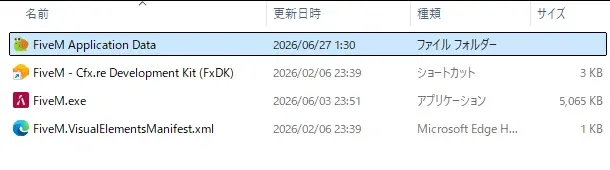
Right-click the FiveM icon and choose "Open file location" from "More." You can also bring this up by searching "FiveM" in the Windows search screen.

[Image blocked: The folder shown via "Open file location" from the FiveM icon. Open "FiveM Application Data"]

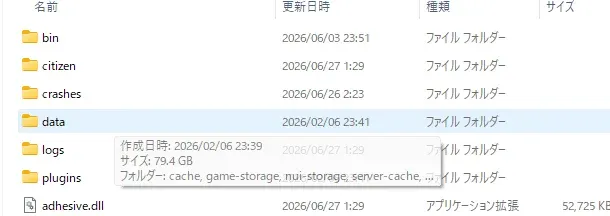
Next, open "FiveM Application Data" and go into the "data" folder inside it.

[Image blocked: The "data" folder inside FiveM Application Data]

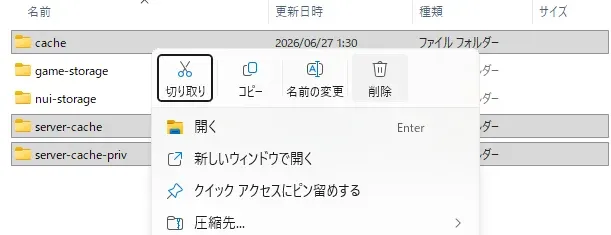
Delete the three folders "cache," "server-cache," and "server-cache-priv" inside the data folder. If these three are gone from the data folder, you have succeeded.

[Image blocked: Delete "cache," "server-cache," and "server-cache-priv" inside the data folder]

Deleting them does not affect your account or the base game. The data needed when you reconnect will be loaded again.

Buildings and roads do not appear / do not load

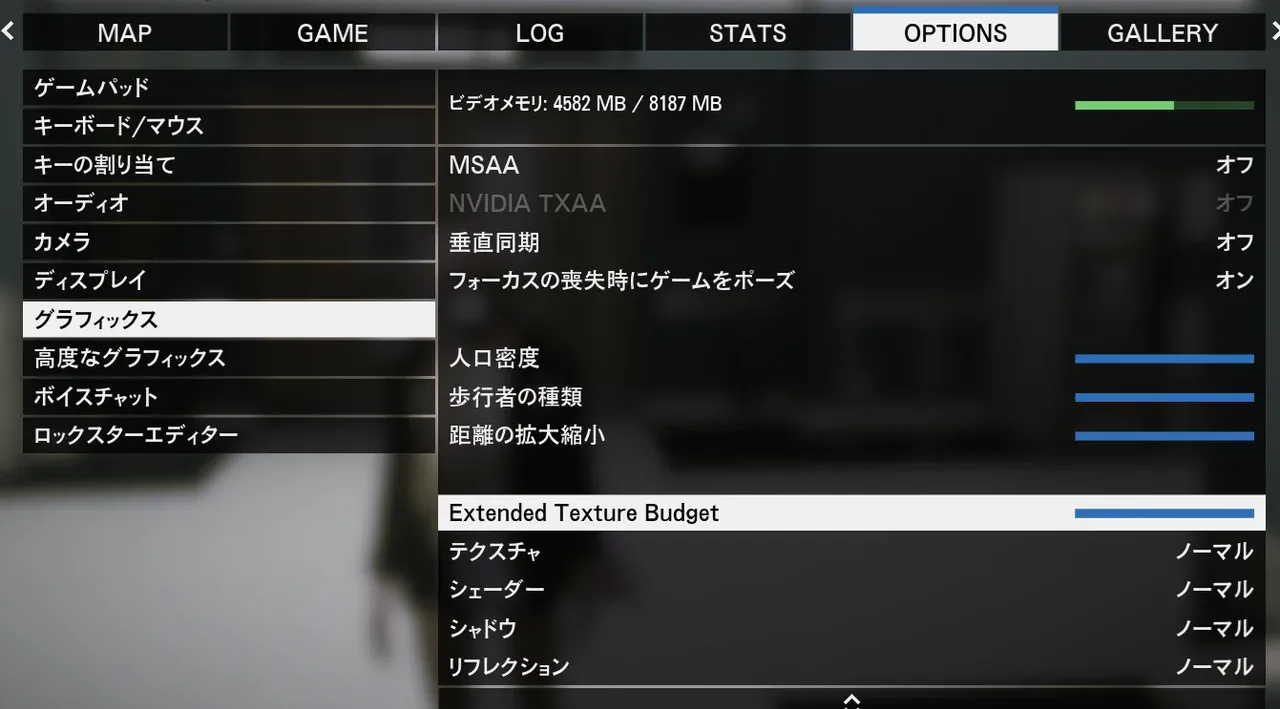
Raising the graphics setting "Extended Texture Budget" to the maximum often improves it. To find the setting, press the Esc key to open OPTIONS, and it is within the "Graphics" item. Because more capacity is allocated to loading textures, the city's rendering tends to become more stable.

[Image blocked: Raise "Extended Texture Budget" in OPTIONS > Graphics to the maximum]

I cannot hear the voices of people around me

Voice chat may be disabled. Press the Esc key to open OPTIONS, and in the "Voice Chat" item, check whether voice chat is correctly set to enabled/disabled.

The game sound stops when I look at the rules (Discord) in a background window

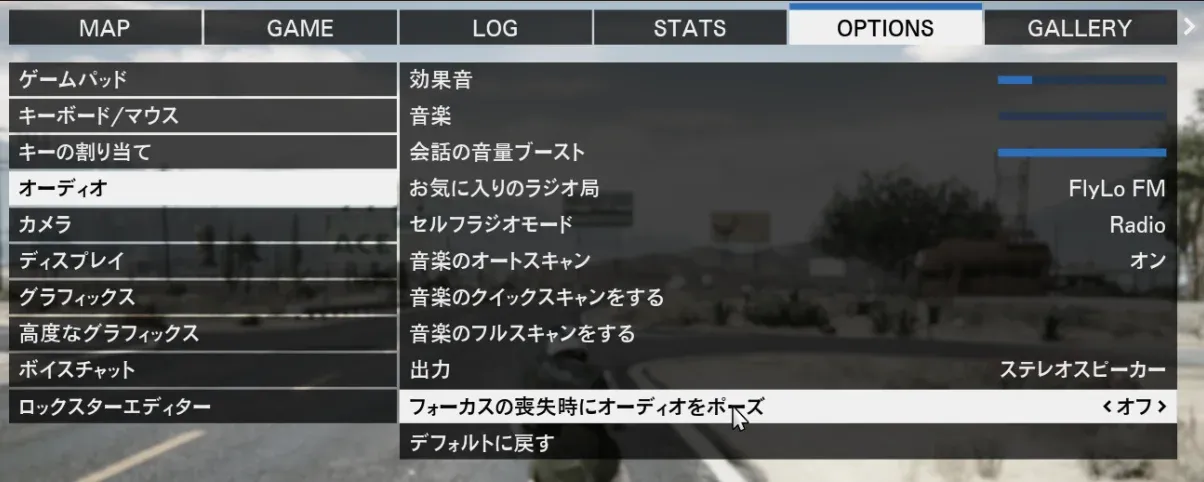
Due to a GTA5 specification, a setting that stops the sound when the window loses focus may be enabled. If you turn off "Pause audio on focus loss" within "Audio" in the options, you will be able to hear voice chat and in-game sound even while you have Discord rules and the like open in another window.

[Image blocked: Turn off "Pause audio on focus loss" in OPTIONS > Audio]

I want to turn off the music on the FiveM menu screen

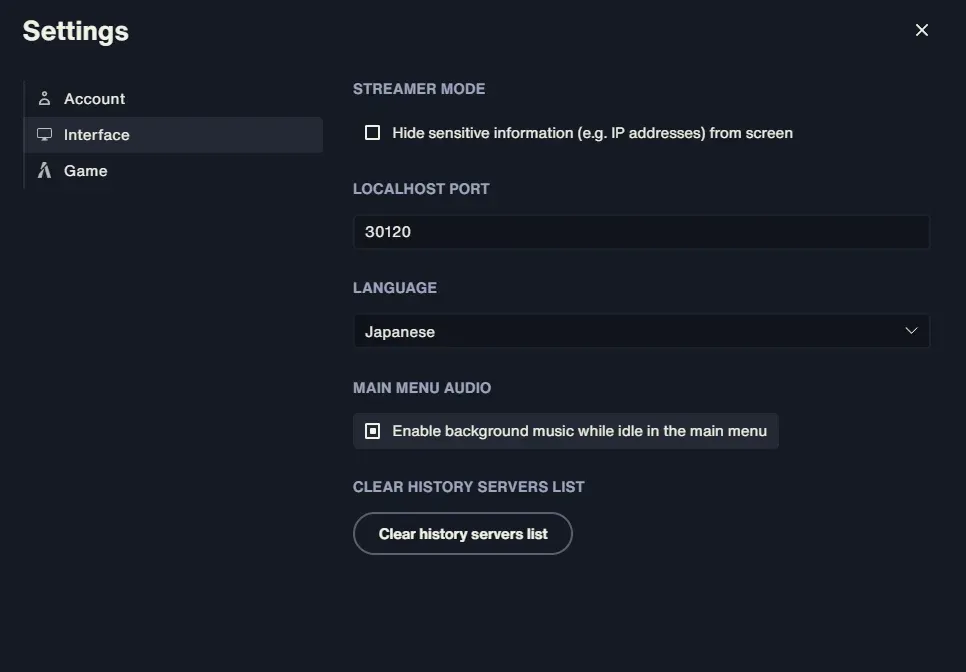
In Settings, within "Interface," unchecking the option related to the main menu's background music turns off the music on the menu screen.

[Image blocked: Uncheck "Main Menu Audio" in Settings > Interface]

I keep punching by accident while handling the inventory

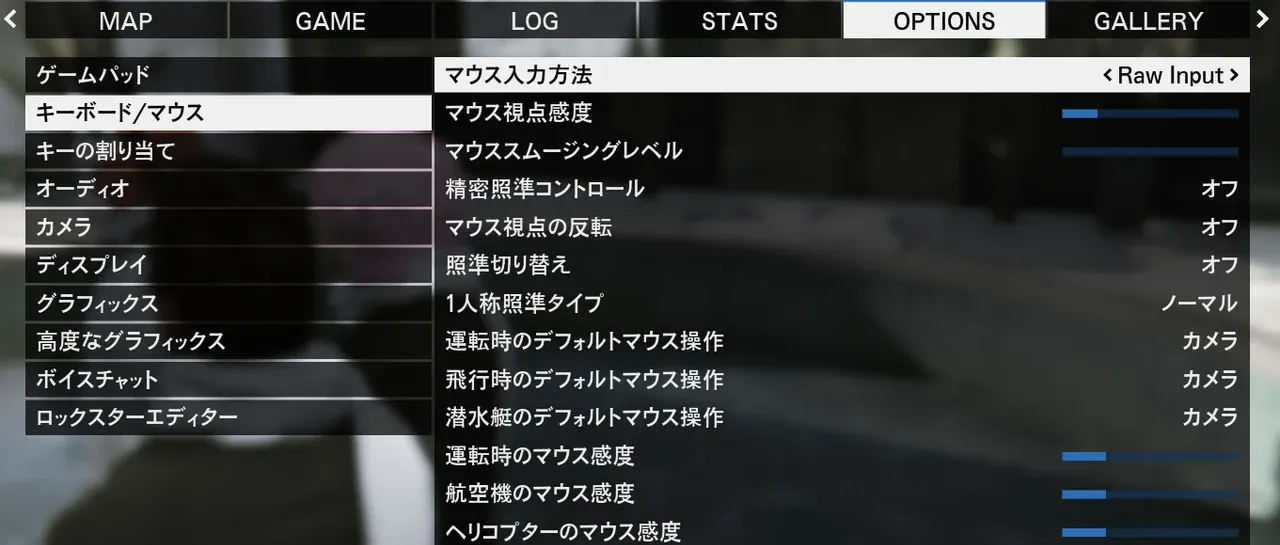
If a punching motion comes out while you are operating the inventory, the mouse input method may be the cause. Press the Esc key to open OPTIONS, and changing "Mouse input method" in "Keyboard/Mouse" to "Raw Input" improves it.

[Image blocked: Change "Mouse input method" in OPTIONS > Keyboard/Mouse to "Raw Input"]

Controls / Key Settings

I want to know the basic control keys

For movement on foot, forward (W), backward (S), left (A), and right (D) are the basics. Along with these, you use run (Shift), crouch (Left Ctrl), prone / crawl (Right Ctrl), jump / dodge (Space), inventory (Tab, or 1), map (P), phone (F1 or M), and so on. With the mouse, left click to punch and right click to aim. The key assignments may differ by server.

I want to know how to swim / underwater controls

Swimming controls are common with GTA Online (the GTA5 base game). When you enter the water you automatically begin swimming; on the surface you take direction with the movement keys (WASD) and move forward with Left Shift (tapping it repeatedly makes you faster).

To dive underwater, press Space. Underwater, you adjust the up/down direction (dive/rise) with W and S, and decide the direction you move with the mouse viewpoint. When you want to surface, input S while holding Left Shift. Note that while you are diving, an oxygen gauge (a light blue bar) is displayed at the bottom left of the screen, and if you do not surface before it runs out, you will drown. When climbing up onto a bank or the ground to get out of the water, use Space.

GTA5's swimming controls are peculiar and easy to drown with the first time. Stay calm and remember: to surface, Left Shift + S.

I want to know the control keys while driving

While driving, accelerate (W), brake (S), left (A), right (D), handbrake (Space), nitro boost (Shift), get in/out (F), turn off the engine (G), and lights (H) are the basics. These too may change depending on the server's settings.

What key opens the phone?

By default it can often be opened with the F1 key or the M key. It may differ by server.

I want to quit the game immediately

Press the F8 key to open the console and type "quit." Running "quit" once more after that lets you quit the game instantly.

I want to set a keybind (shortcut)

There are mainly two ways to set it.

The first is to open the console with the F8 key and type bind keyboard "the key you want to set" "the content you want to set" into the input field, then press Enter. If you want to change or update the setting, you first need to release it once with unbind keyboard "the key you want to set".

The second is to press the Esc key to open OPTIONS, and assign any key to "(custom_keyboard)" in the "FiveM" item within "Key Bindings."

If you want to make emotes and the like into shortcuts, you can use this mechanism to assign them to keys you like.

What is the "Mind's Eye" (kokoro no me)?

A euphemism in Japan's GTARP referring to the left Alt key. It is used when opening an interact (operation) menu set on objects, NPCs, and the like. It is also used as a guide for lining up your aim on servers where the crosshair cannot be used. Whether it is displayed and supported differs by server.

About Aim / Crosshair

I want to display a crosshair

If "t/aim" cannot be used, there is a method of displaying a crosshair by entering a setting command from the console (F8). However, because some servers prohibit the use of a crosshair itself, be sure to check each server's rules. If the crosshair is prohibited, line up your aim with the "Mind's Eye" of the left Alt key.

For details on the commands to change the crosshair's shape and color, or to hide it, see the separate FiveM Command Dictionary [blocked] page.

About Commands

In GTARP, by typing commands starting with "/" into the chat field, you can do various things such as checking your job, requesting rescue, and operating vehicles. Here are some representative examples.

/me is a command that displays your character's situation or actions in text. /job displays your current job, /911 reports to the police/EMS, and /escort is used to escort a downed player, among others.

These commands differ by server in name and availability (for example, on some servers the report is /311). A list and details of the commands you can use are compiled on the separate FiveM Command Dictionary [blocked] page, so please refer to it as well.

Disclaimer

This article is an explanatory piece organized by GTA6 FEED based on various publicly available information and actual operation, and it has no relationship whatsoever with Rockstar Games or Take-Two Interactive, or with the operators of the various servers. The settings, controls, and commands introduced here may differ depending on the server, the version, and the installed scripts, and may change over time. For the latest and accurate information, please check the official information of each server you join.