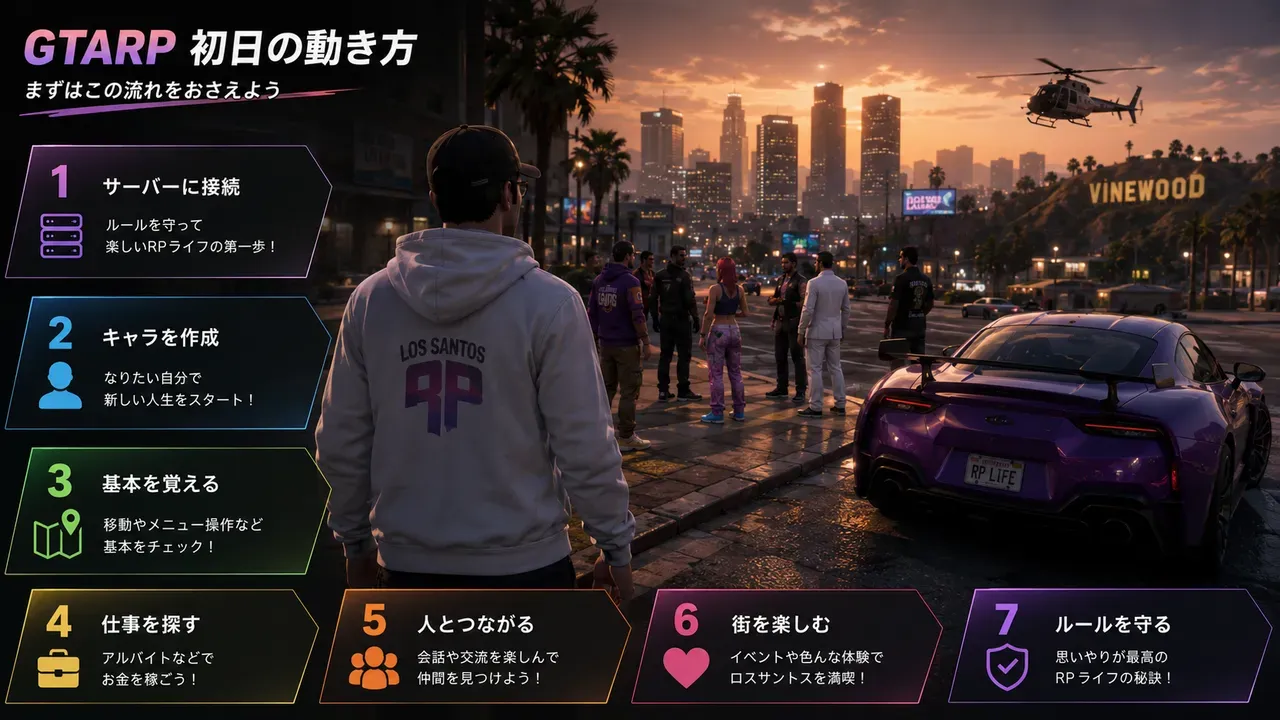
Many people, after watching streams as observers, come to want to join as residents of the city themselves. But even once you are accepted onto a server, it is not uncommon to be at a loss, not knowing what to do on the first day. In this article, GTA6 FEED has organized, step by step, for those joining a FiveM GTARP server for the first time, everything from preparation before entering the city to how to act on day one and the failures to avoid.
This article assumes a stage where you have finished installing FiveM and completed the approval (an application or whitelist registration) for the server you want to join. For installation and how to choose a server, please refer to the separate articles. Note that the controls and rules introduced here are strictly general examples, and the details differ greatly by server. In the end, the official rules of each server you join take priority.
[Image blocked: An image of standing as a resident of the city on your first day after joining a GTARP server]
What to Read First, Above All — The Roppou (Rulebook)
Before entering the city, there is one thing you should do before anything else: read that server's official rules, the so-called roppou (rulebook).
[Image blocked: Read the server's official rules, the "roppou (rulebook)," as the top priority]
In GTARP, there are many prohibited acts where "I didn't know" is no excuse, and if you join without reading the rules, there is a danger of violating them without ill intent and being banned (expelled). In addition to basic prohibited acts like RDM, VDM, meta, and power play, there are also detailed rules unique to that server. If you do not understand the meaning of a term, it is good to check the GTARP Glossary [blocked]. It is a lot to read, but if you skip this, there is a high chance you will stumble on the first day.
Preparation Before Entering the City
After reading the rules, there are several settings you should finish before connecting.
First, think about your character's profile. Deciding on a name and a rough background and personality gives consistency to your behavior in the city. You do not need to craft it too much; you can expand it as you play.
Second, change your FiveM player name to your character name. In the default settings, your Steam name is often reflected, and if left as is, the information of the person behind the screen will be visible in various places. You can change it from the gear icon at the top right of the FiveM screen. It is also good to align your server Discord nickname with your character name.
Third, check your voice chat and key settings. On many servers, voice chat is off right after connecting, leaving you unable to hear your own voice or others'. Turn the setting on and test in advance that your mic works correctly. Key assignments can be checked and changed from the FiveM item within the options via the Esc key. At this time, because operations and chat may not be accepted while in Japanese input (full-width) mode, the basic approach is to switch to half-width alphanumeric.
Note that "outdated" may be displayed at the top right when you select a server, but this is an update notice for server operators, and there is no need for the player to reinstall or the like. You can connect without worrying about it.
What to Do First Once You Enter the City
In Japan's GTARP, descending into the city for the first time after your preparation is ready is sometimes expressed as "first waking (hatsu-kishou)." On the first day, not rushing is the biggest tip.
[Image blocked: The flow of how to act on your first day in GTARP (image)]
The first thing to do is not to suddenly cause an incident, but to walk around the city and grasp the atmosphere. Just by looking at where things are and how people spend their time, you come to understand the city's mood.
Some servers have a mechanism to attach a tag or name indicating that you are a new resident. Using this, the residents around you often sense that you are a beginner and show consideration, so if it is provided, it is good to make use of it.
On the control side, you should learn the interact operation. On many servers, holding the left Alt key (sometimes called the "mind's eye") makes a mark appear on a target, and you can open a menu with a right click or the like. Opening and closing doors, operating objects, and job menus are often called up from this operation. Also, some servers let you switch the range your voice reaches in three levels — "whisper, normal, shout" — and using them according to the situation makes for natural conversation.
When you meet someone, greet and introduce yourself naturally as your character, not as the person behind the screen. And it is good to try taking on one job. Rather than diving into the center of conflict like gangs or police from day one, it is said that starting with a livelihood job such as a restaurant, taxi, or mechanic makes it easier to get used to the city and people. As you naturally interact with other residents through work, your own story starts to move.
Things You Must Not Do on the First Day
To avoid trouble and bans, here are the acts to be especially careful about on the first day.
RDM (attacking/killing without reason) and VDM (running people over with a car without reason) are considered serious violations on almost all servers. Avoid violence that has no necessity in the roleplay.
Be careful of meta (metagaming) too. This is using information your character could not originally know in your actions. For example, even if you can see another player's connection name (such as green text) on the screen, you need to treat it as information your character cannot see. If it is displayed, it is preferable to hide it in the settings. Bringing information you obtained from another stream as an observer into your character's judgment is also meta.
Avoid power play (power gaming) as well. Roleplay that one-sidedly forces developments without leaving the other party room to react breaks the other's experience.
It is also important not to bring OOC (topics about the person behind the screen or outside the game) into the city. Refrain from talk about streams or real life while you are in the city as your character, and keep it to a minimum only when truly necessary, such as a technical problem. Even if something you do not understand comes up, rather than asking loudly in the city, it is better to ask in the OOC venue described below.
How to Rely on Others When in Trouble
It is natural not to be able to perform well from the first day. At first, it is enough to start by watching the behavior of the residents around you and imitating them.
When you are unsure about controls or progression, it is good to ask in the Discord OOC/question channels that many servers provide, or the operators and experienced residents. For describing situations during roleplay, some servers let you use commands that show actions and states in text, and there are sometimes dedicated commands for reporting. Because these commands differ by server, please check the FiveM Command Dictionary [blocked] or that server's guidance.
Some servers call logging out after finishing a day of play "sleeping (shushin)." The tip for enjoying it for a long time is to not force yourself to continue for long hours, but to visit the city at your own pace.
Sources / References
The main sources referenced in creating this article: the GRVL official site (FiveM installation and initial setup guide), the CLUB 9w1 FiveM manual Wiki, FiveM beginner explanatory articles, and others. The definitions of terms such as RDM, VDM, meta, and power play follow GTA6 FEED's GTARP Glossary. Note that behaviors such as voice chat being off initially, the location of key settings, and the initial display of the player name are general FiveM specifications, but new-resident tags, interact keys, the various commands, and the composition of jobs differ greatly by server.
This article is a commentary by GTA6 FEED and has no relationship whatsoever with Rockstar Games, Take-Two Interactive, or the operators of the various servers. Because controls, rules, and commands may change depending on the server or MOD specifications, please be sure to check each server's official rules before joining.